Skip to content
RepleteCare

AI-native EMR for Indian specialists · Neurology first

The consultation comes first. The record keeps up.

Last visit carried forward, suggested medicines and investigations against each diagnosis, advice in the patient's language, a prescription on your letterhead: one screen, start to sign-off. Press Dictate and the scribe drafts the note as you talk, in ten Indian languages and English.

Free for practising doctors. No hardware to buy. Works through power cuts.

  • 10 Indian languages + English
  • ABDM & ABHA native
  • One queue: front desk, nurse, doctor
  • Neurology first, four specialties next

Illustration of the scribe at work. Every line waits for the doctor to accept, edit or discard it.
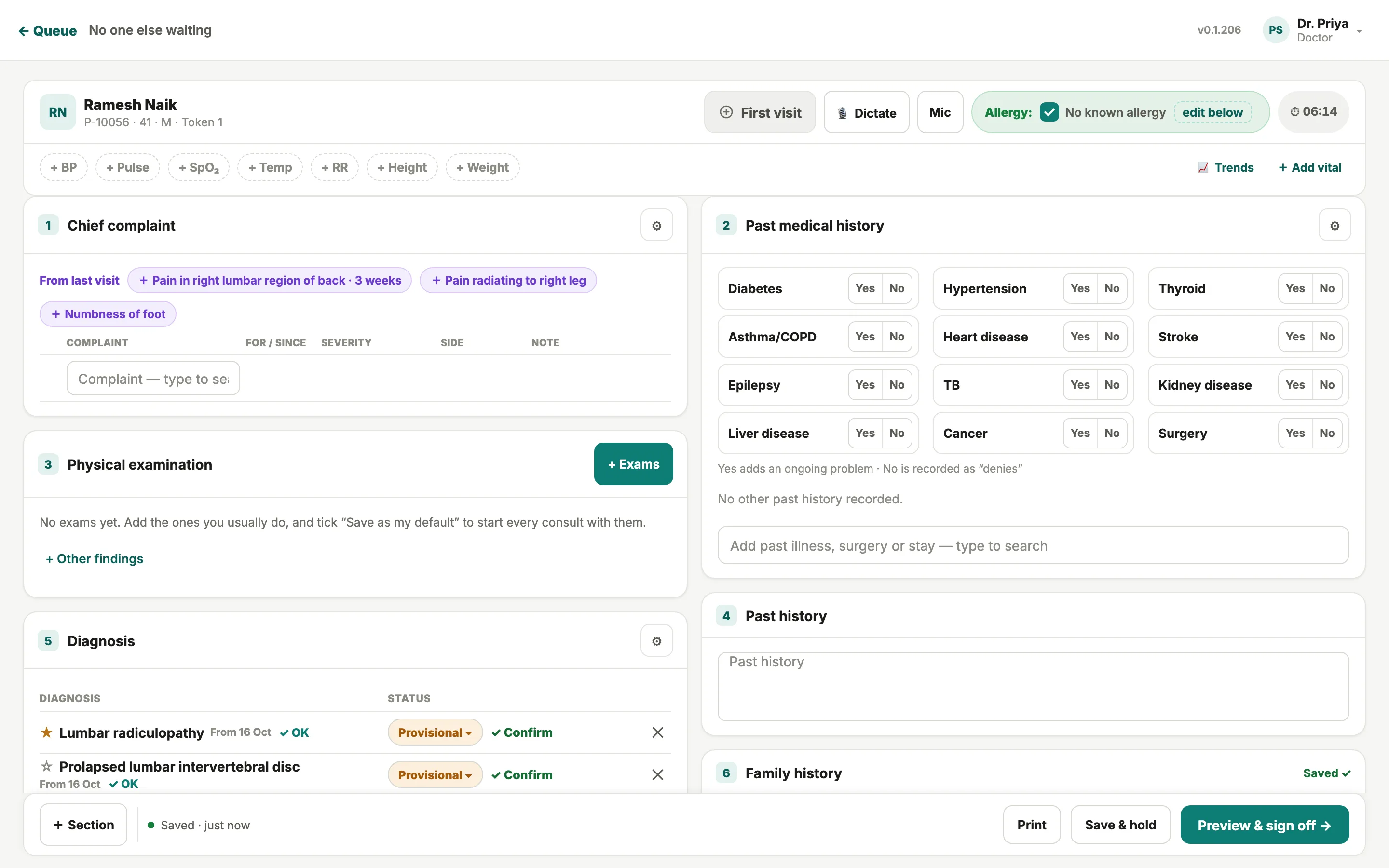
RepleteCare consultation screen: patient header with Dictate and Mic, chief complaint with last visit's complaints carried forward, past medical history as a Yes/No grid, and diagnosis
  1. Last visit’s complaints, carried forward
  2. Dictate — the ambient scribe
  3. Trends across visits
The consultation screen in the current build. Demo clinic, fictional patients.

11

Languages the scribe understands: ten Indian, plus English

₹0

Subscription fee for the core platform. Free for practising doctors

1

Live queue shared by front desk, nurse and doctor

Offline

Consultations and prescriptions keep working through a power cut

The tour

Forty seconds, no voice-over: the consultation, the queue, the languages.

Built from the same screens you see on this page. Sound off; nothing to unmute.

The consultation screen

The whole consultation on one screen. Nothing typed twice.

History, examination, diagnosis, medication, advice and follow-up sit in numbered sections you can reorder. Last visit's complaints arrive as chips, each diagnosis brings suggested medicines and investigations you tap to add, and 'Past visit' repeats the last prescription. Autosave runs throughout; when you are done, preview and sign off.
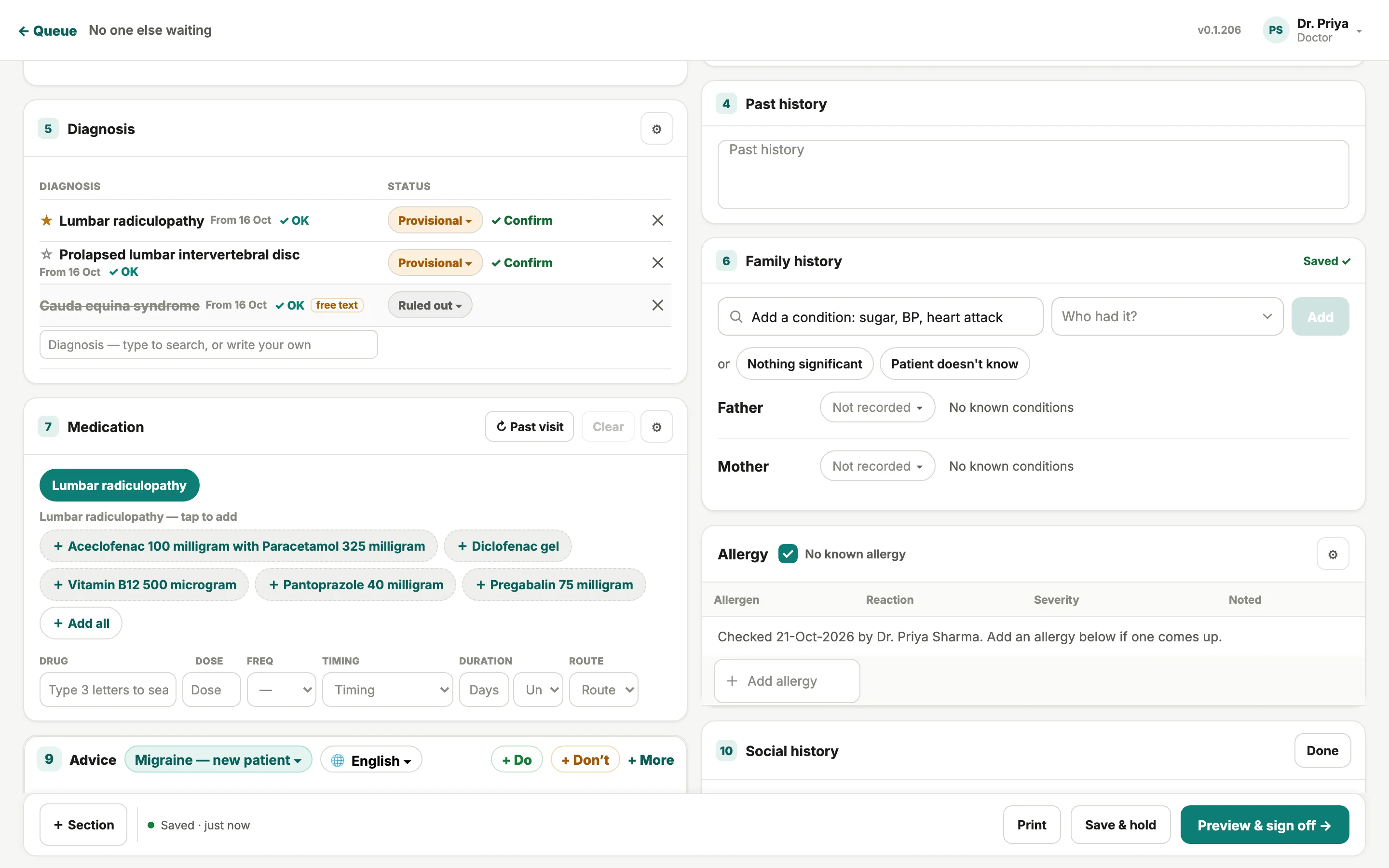
  • Past medical history as a Yes/No grid; No is recorded as denies
  • Dose on the 1-0-1 grid, with timing, duration and route
  • Save & hold for the patient who steps out
Diagnosis section with Provisional, Confirmed and Ruled out statuses, and the Medication section with suggested medicines to tap and add
  1. Provisional · Confirmed · Ruled out
  2. Suggested for this diagnosis — tap to add

The clinic around the consult

Front desk, nurse and doctor on one live queue.

Every role has its own home screen; all three read from one board. The front desk books, checks in and settles bills across every doctor. The nurse records vitals and sends the patient through, allergies flagged in red. The patient reaches you with a token number and vitals already taken.

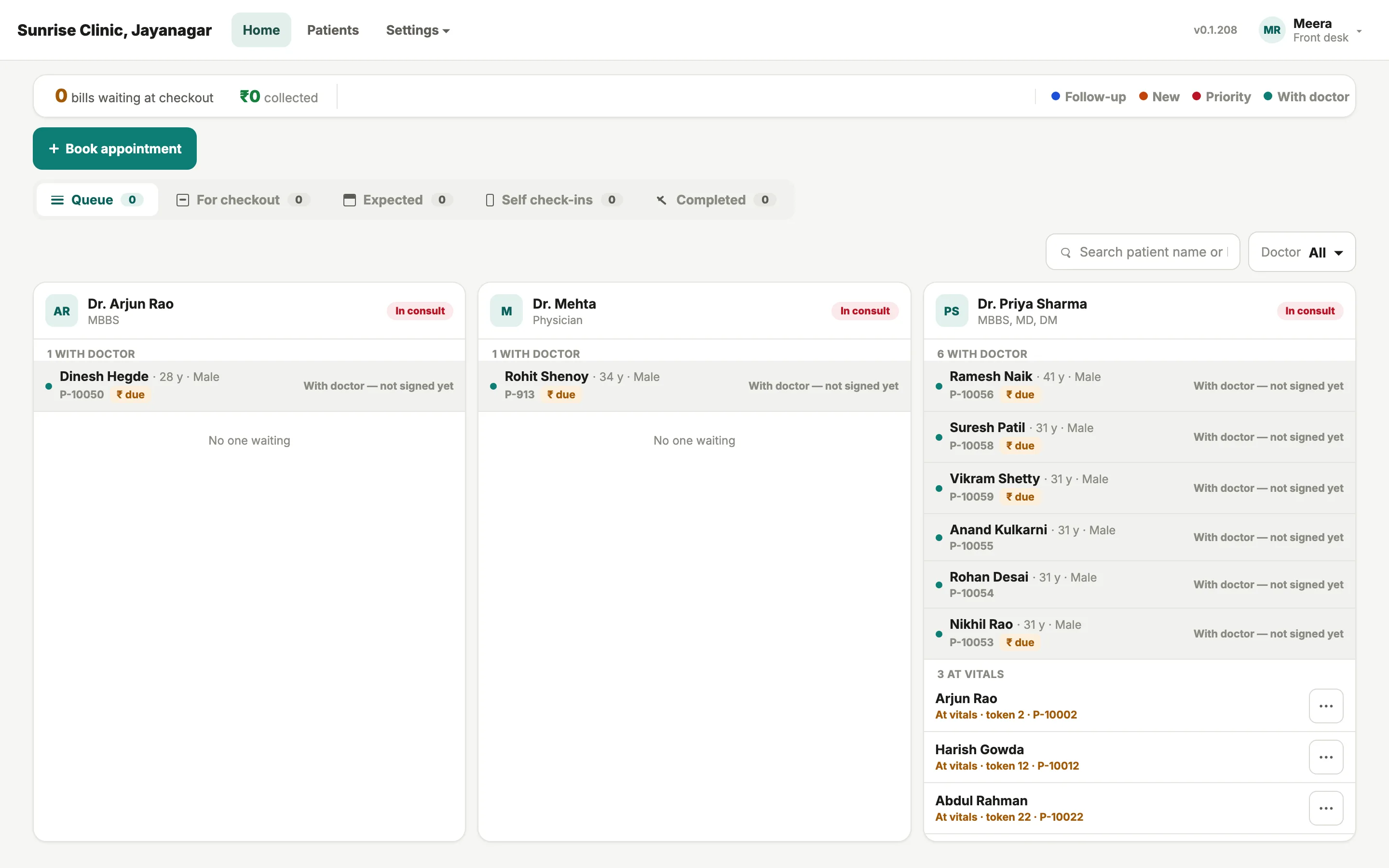
Front-desk board with one column per doctor, patients grouped as with doctor or at vitals

Front desk

One column per doctor, in consult or free, with bills waiting at checkout and ₹ collected for the day.
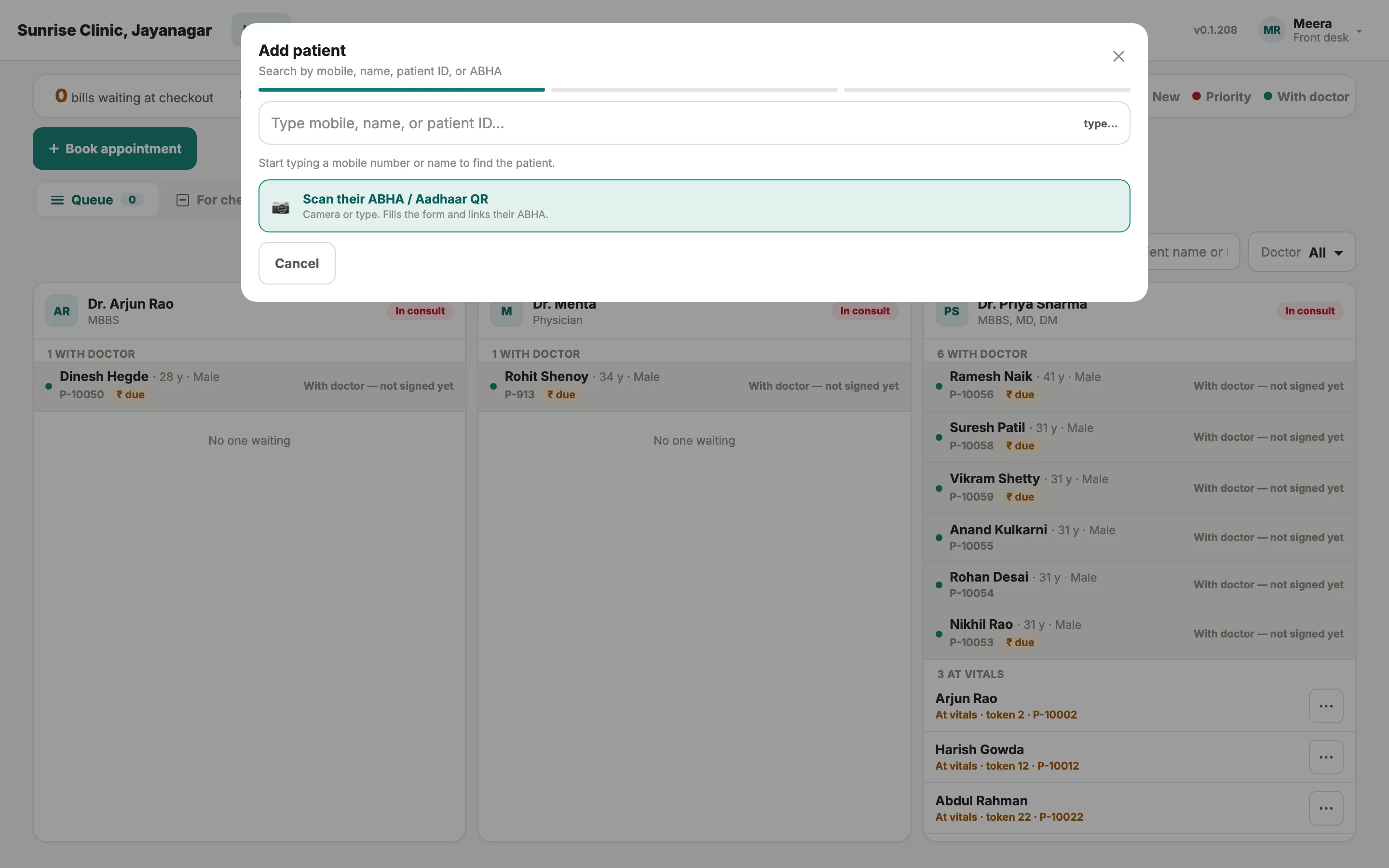
Add patient dialog: search by mobile, name, patient ID or ABHA, or scan the ABHA / Aadhaar QR

Check-in

Add a patient by mobile, name, patient ID or ABHA; scan the ABHA or Aadhaar QR and the form fills itself.
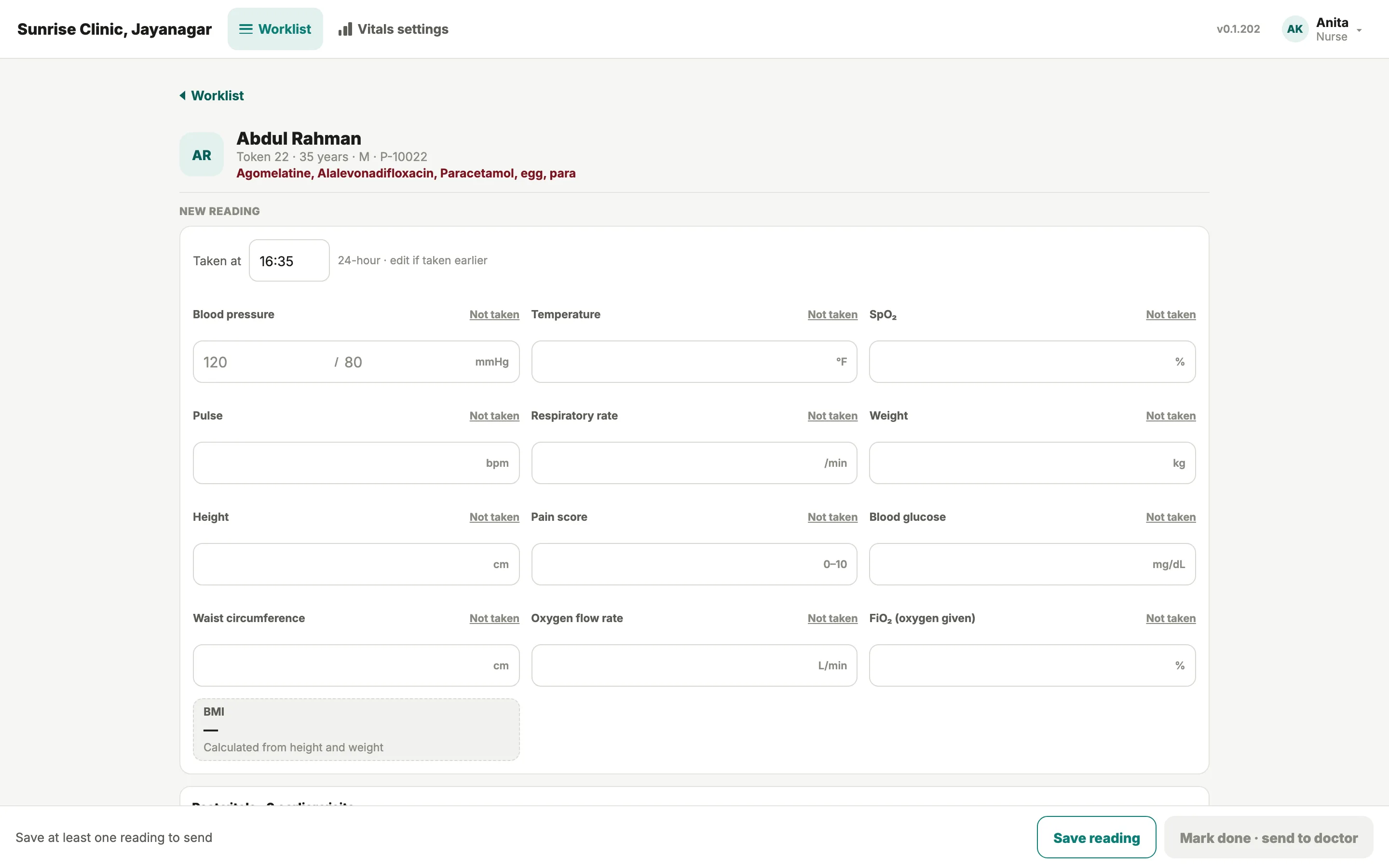
Nurse vitals form with blood pressure, temperature, SpO2, pulse and weight, allergies flagged in red

Nurse

Vitals recorded and sent through with one tap, allergies flagged in red, BMI worked out on the spot.

Block time on the schedule; an emergency walk-in still gets in with a logged override.

Why it is different · The ambient scribe

You talk to the patient. The note drafts as you go.

Press Dictate and consult the way you always have: a question in English, an answer in Kannada, a clarification in Hindi. The scribe follows the switch mid-sentence and drafts a structured note, section by section, for you to accept, edit or discard. Nothing enters the record until you say so.

  • Hindi, Bengali, Telugu, Marathi, Tamil, Urdu, Gujarati, Kannada, Malayalam, Punjabi and English
  • A note written for the chart, not a transcript you would rewrite anyway
  • It runs only when you start it from the consult header; leave it alone and the consult is typed
Consult header with the Dictate and Mic buttons, allergy status and quick vitals chips
  1. Dictate
  2. Mic
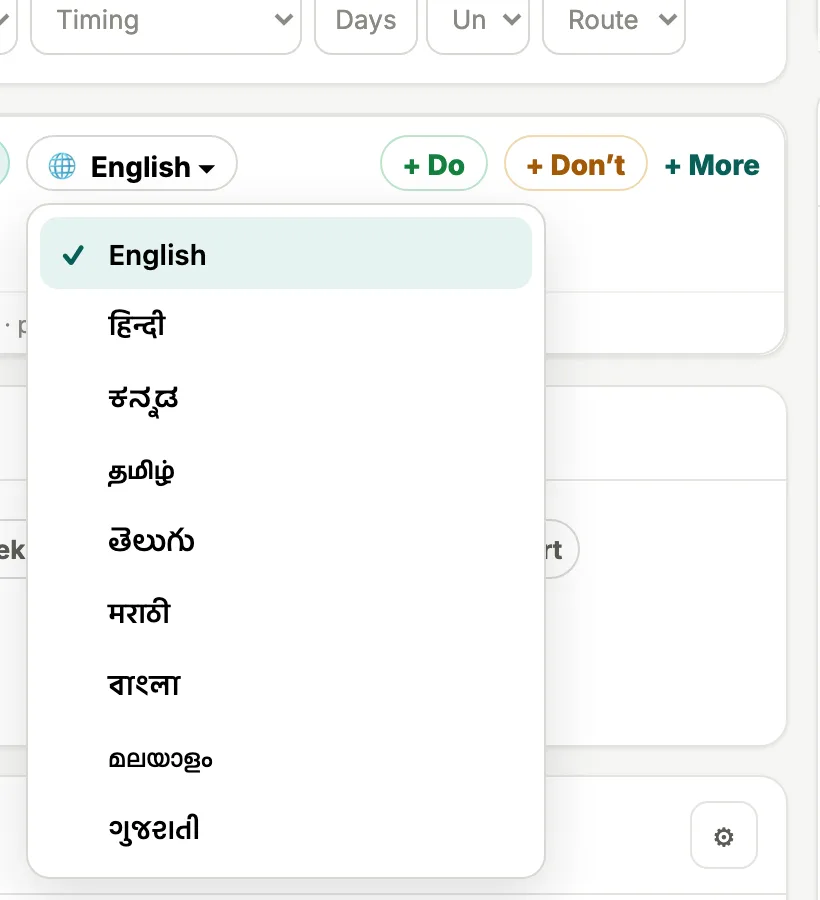
The Advice language dropdown on the consultation screen, listing English, Hindi, Kannada, Tamil, Telugu, Marathi, Bengali, Malayalam and Gujarati
Advice prints in the patient’s language: the dropdown today offers English and eight Indian languages. The eleven-language claim is the scribe’s.
  • हिन्दी Hindi
  • বাংলা Bengali
  • తెలుగు Telugu
  • मराठी Marathi
  • தமிழ் Tamil
  • اردو Urdu
  • ગુજરાતી Gujarati
  • ಕನ್ನಡ Kannada
  • മലയാളം Malayalam
  • ਪੰਜਾਬੀ Punjabi
  • English

Longitudinal records

What happened three visits ago, without opening a file.

Every visit across every doctor in the clinic sits on one record, with uploads, forms and bills on their own tabs. Tap Trends and earlier BP, weight or glucose is charted across visits, so a creeping BP is a line rather than a memory. The chart does the remembering.
  • ‘From last visit’ chips and ‘Past labs’ bring the previous consultation into this one
  • Medication history kept as Taking, Stopped or Not sure, so what was tried before is never lost
  • Sensitive history is never printed, never shown in the patient app, and every opening is logged
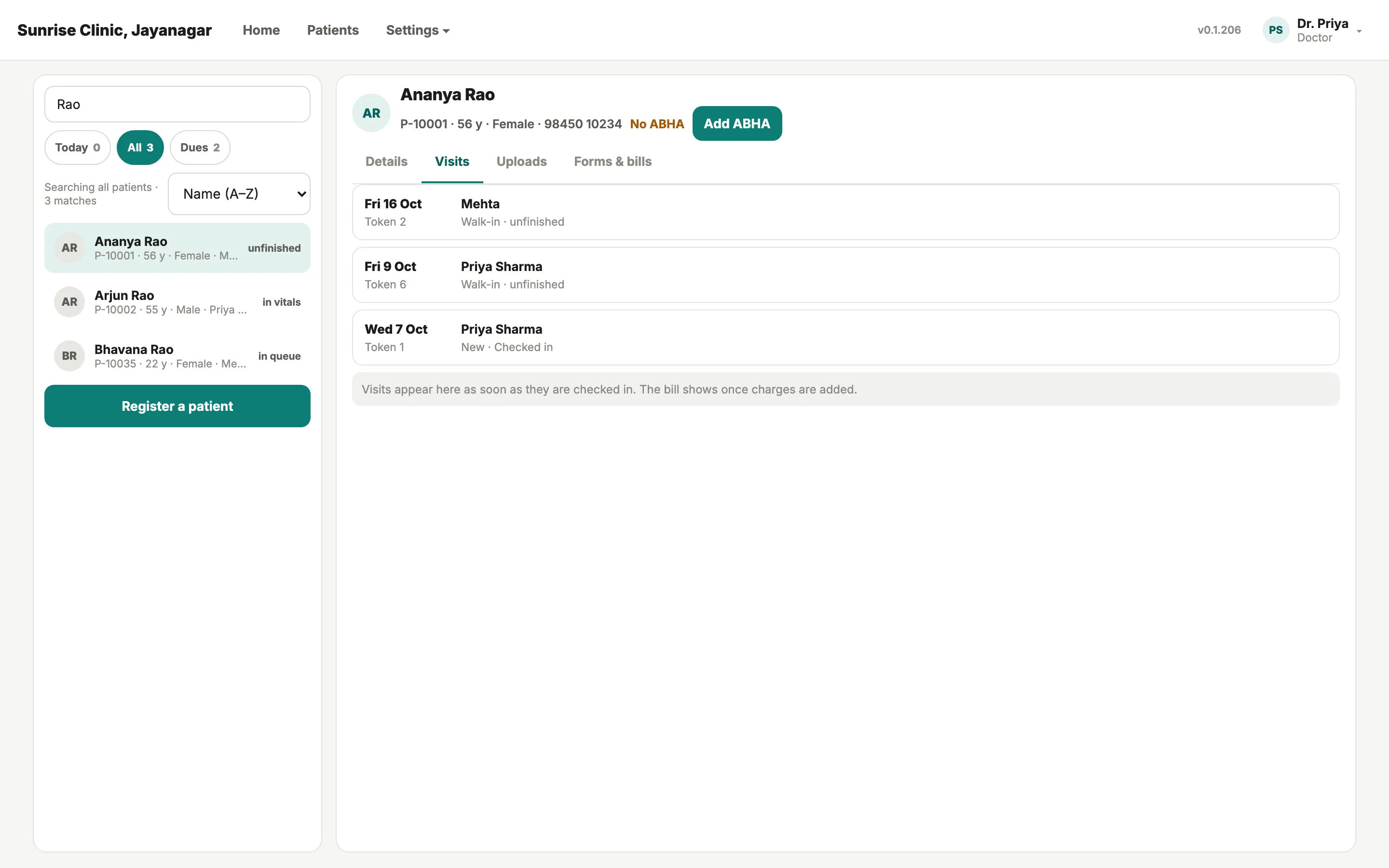
A patient record on the Visits tab, listing visits by date, doctor, token and status, with Details, Uploads and Forms & bills tabs
  1. Details · Visits · Uploads · Forms & bills
  2. Every visit, every doctor, one record
One patient’s visits across two doctors in the demo clinic.

Why it is different · The clinical harness

The 43rd patient deserves the same consultation as the 3rd.

Nobody skips a question because they do not know it. They skip it because the waiting room is still full and the last four patients have blurred together. The harness listens alongside the scribe with a model of what a thorough consultation covers, and surfaces what has not come up.

  • Prompts only. It never diagnoses, never prescribes, never writes to the chart; dismiss any prompt, or switch it off for a patient or the whole practice
  • What counts as complete differs by specialty, so it is built per specialty, not from a generic checklist; neurology is the deepest build
  • Early-access doctors are the first to use it
Illustration of a live consultation: speech transcribing on the left in Hindi and English, the note assembling in the middle, and a clinical harness panel on the right prompting questions not yet asked — each one dismissible by the doctor. Listening · Hindi + English TRANSCRIPT Patient सिर में दर्द तीन हफ़्ते से है Doctor Any vomiting or blurring of vision? Patient नहीं, उल्टी नहीं हुई code-switching ok NOTE — DRAFTING HISTORY EXAMINATION ASSESSMENT PLAN Draft — nothing saved yet CLINICAL HARNESS Prompts, not conclusions NOT YET ASKED Any early-morning headache on waking? Ask Dismiss WORTH CONSIDERING Red-flag screen for secondary headache ↳ cited guideline Vomiting / visual symptoms — covered Harness
Illustration: the harness panel as designed.

Your clinic's name on it

Signed on your letterhead, with advice in the patient's language.

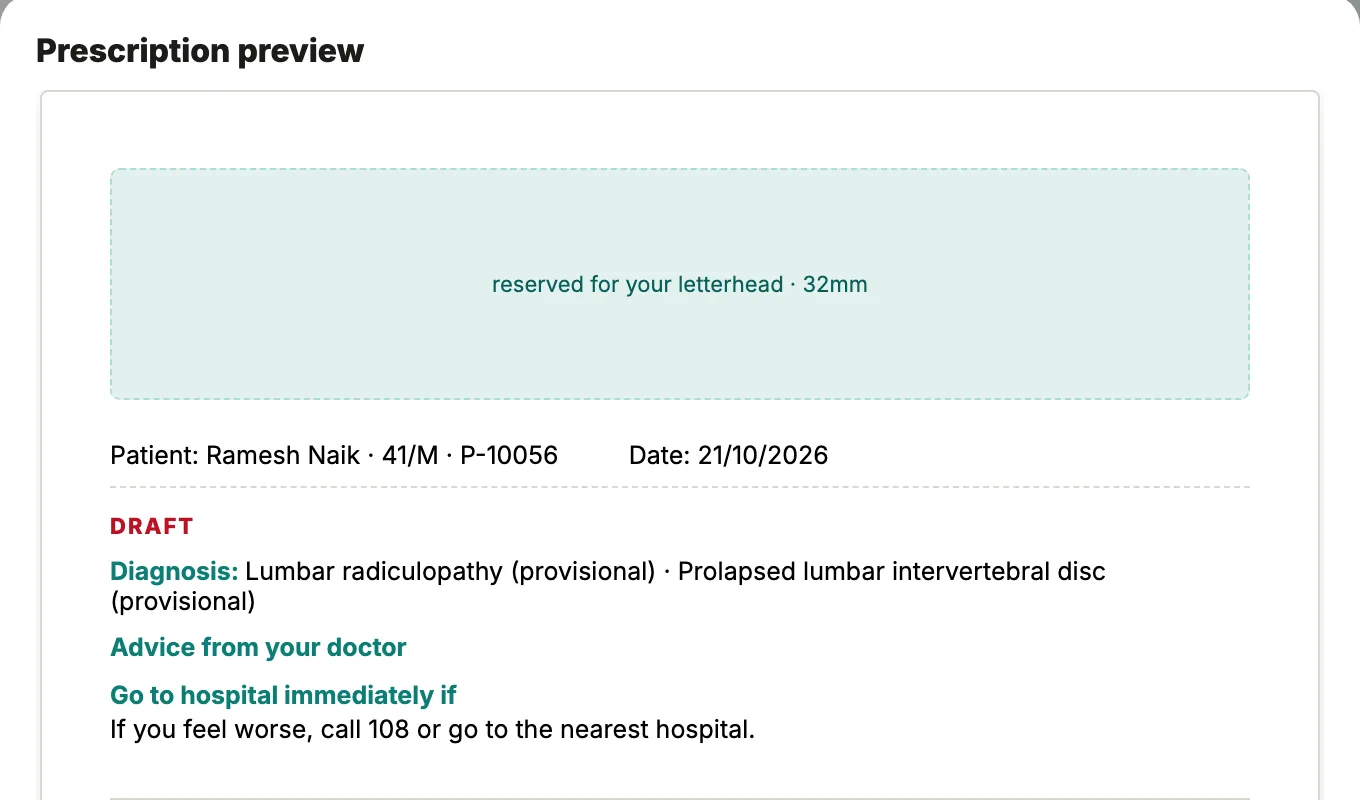
Preview the prescription, add a summary for the patient, and sign. On plain paper the app prints your letterhead, with the clinic name and section labels in the colours you choose; on pre-printed stationery it leaves the space clear. The follow-up is booked before the patient stands up.
  • Clinic logo, header and footer images, your name, qualifications and registration number: your name on the prescription, not ours
  • Advice goes out as Do and Don’t lines in the language you choose for the patient; the ‘Call 108 / nearest hospital’ line is never left off
  • Consent forms and certificates (fitness, leave, travel, pre-op, discharge) are clinic-editable, signed by doctor, patient and witness
Prescription preview with a 32mm space reserved for the clinic letterhead, the patient line, diagnosis, advice and a draft watermark
  1. Reserved for your letterhead

Between OPD visits

Care that follows the patient home, and brings them back.

Between visits, RepleteCare follows up on WhatsApp: are the tablets being taken, is the report due, a firmer nudge if it has not come, a task for your staff if it never does. Two weeks later the patient is a Follow-up token in your morning queue, report in hand.
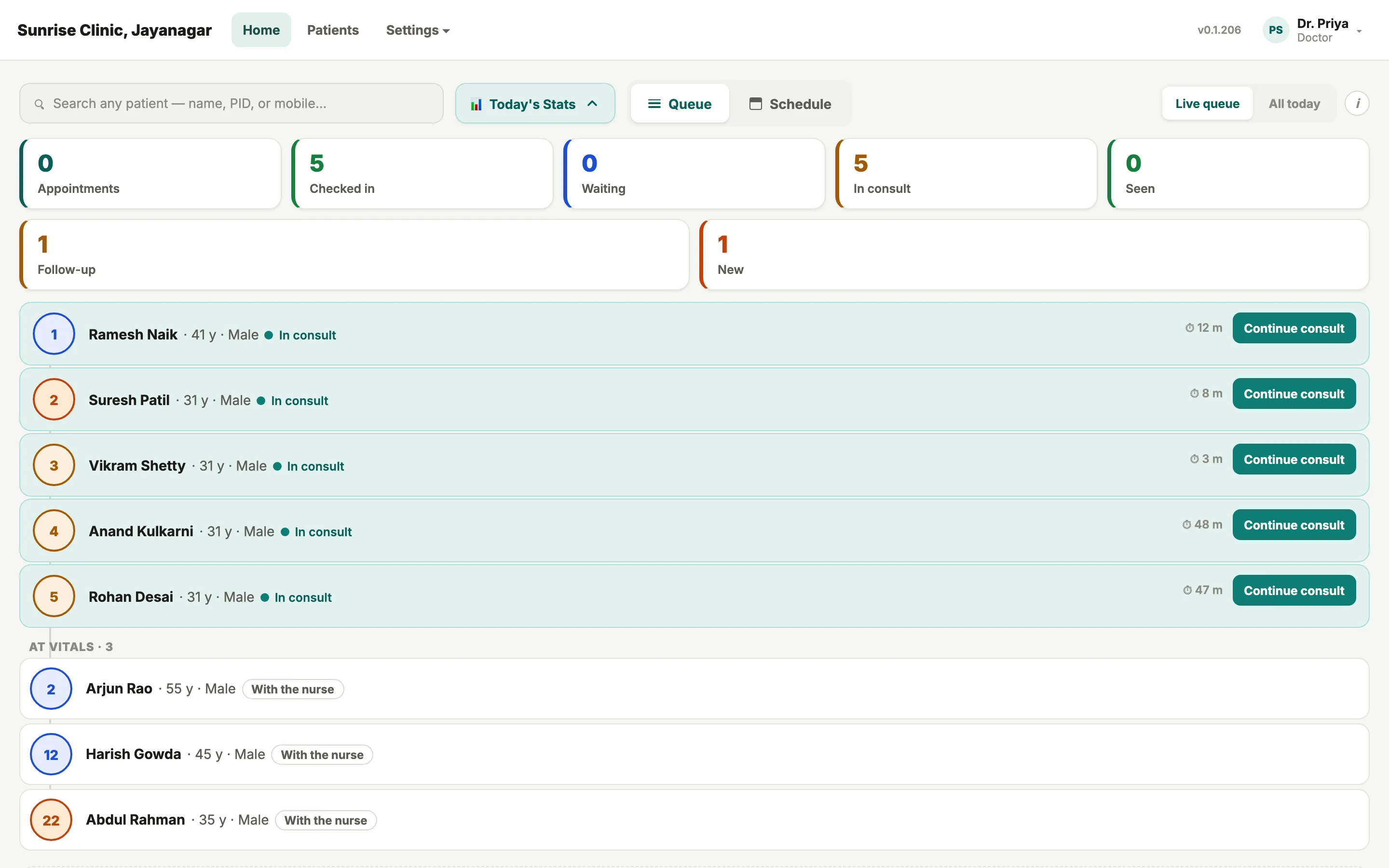
  • Follow-up set in the consult: 3 days, 5 days, 1 week, 2 weeks or 1 year; with report; or only if needed
  • Clinical questions go to your worklist, doctor-governed throughout; a bot never answers them
Doctor's home screen with Today's stats, including a Follow-up count, and the live queue with token numbers
  1. Follow-up count for the day
  2. Token numbers, time in consult

The patient app · Video consults

Your clinic, on your patient's phone.

Patients sign in with an OTP, no password; one number holds the whole family. They see your clinic's name and yours, book visits, video visits included where you offer them, and see results once you release them. It is not for emergencies: the app says call 108.
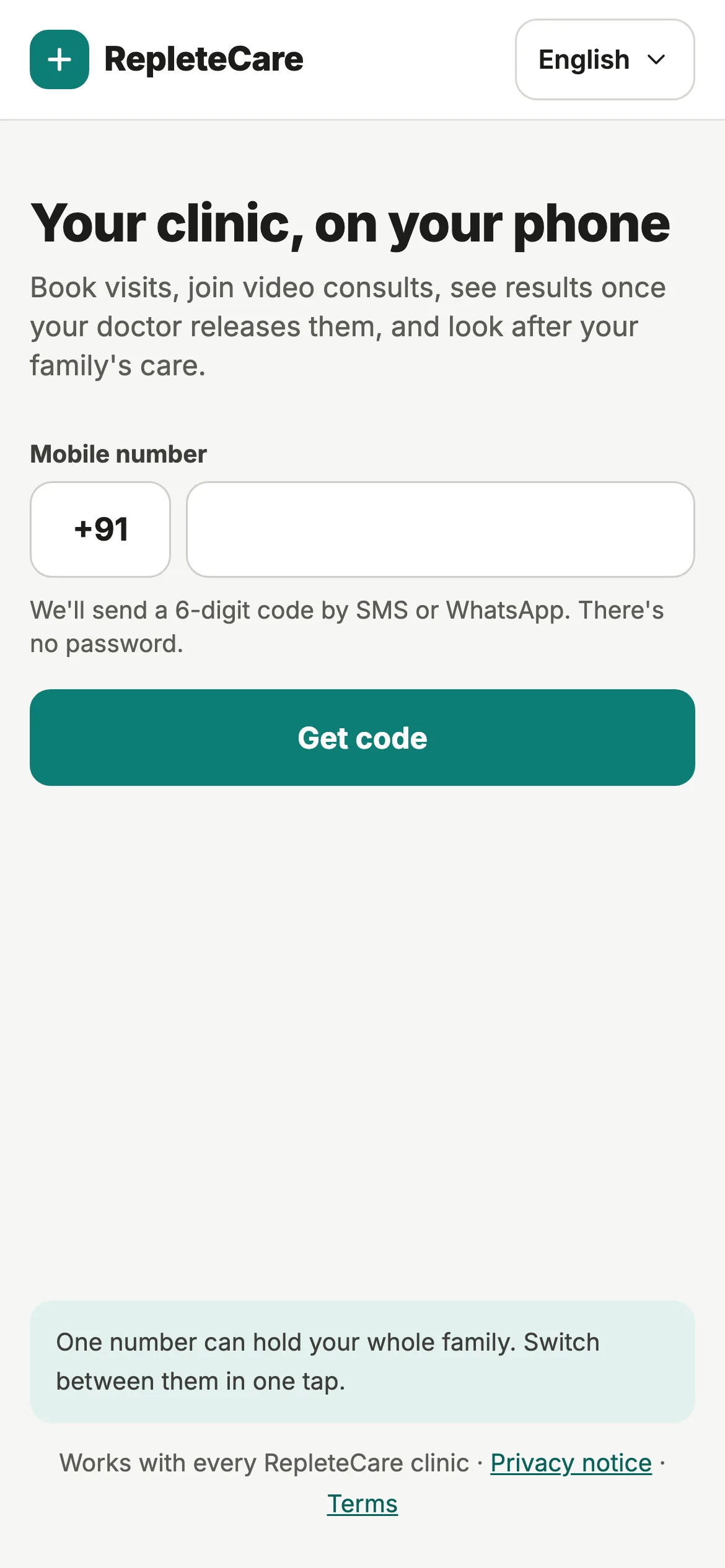
  • Sign-in code by SMS or WhatsApp; switch between profiles in one tap
  • Video consults run under India’s Telemedicine Practice Guidelines, with a waiting room that opens at the appointment time and consent recorded per visit
  • Add the appointment to the phone’s calendar; sensitive history you mark private is never shown in the app
RepleteCare patient app sign-in: Your clinic, on your phone. Book visits, join video consults, see results once your doctor releases them.

See it against your own OPD day.

Request early access and tell us your specialty, your city and the languages your clinic runs in. Neurologists can request early access now; other specialties get first access when theirs is ready.

No subscription fee for the core platform. No hardware to buy. Works through power cuts.